September 15, 2026 · 9 min read · Updated September 15, 2026
Calling Rust from Flutter: FRB or UniFFI?
A beginner-friendly comparison of flutter_rust_bridge and UniFFI, with small examples, practical differences, and guidance on choosing between them.
This article uses UniFFI for what is sometimes called uniffi rs. You do not need to understand every implementation detail at first. The main idea is simple: both tools let another programming language call Rust.
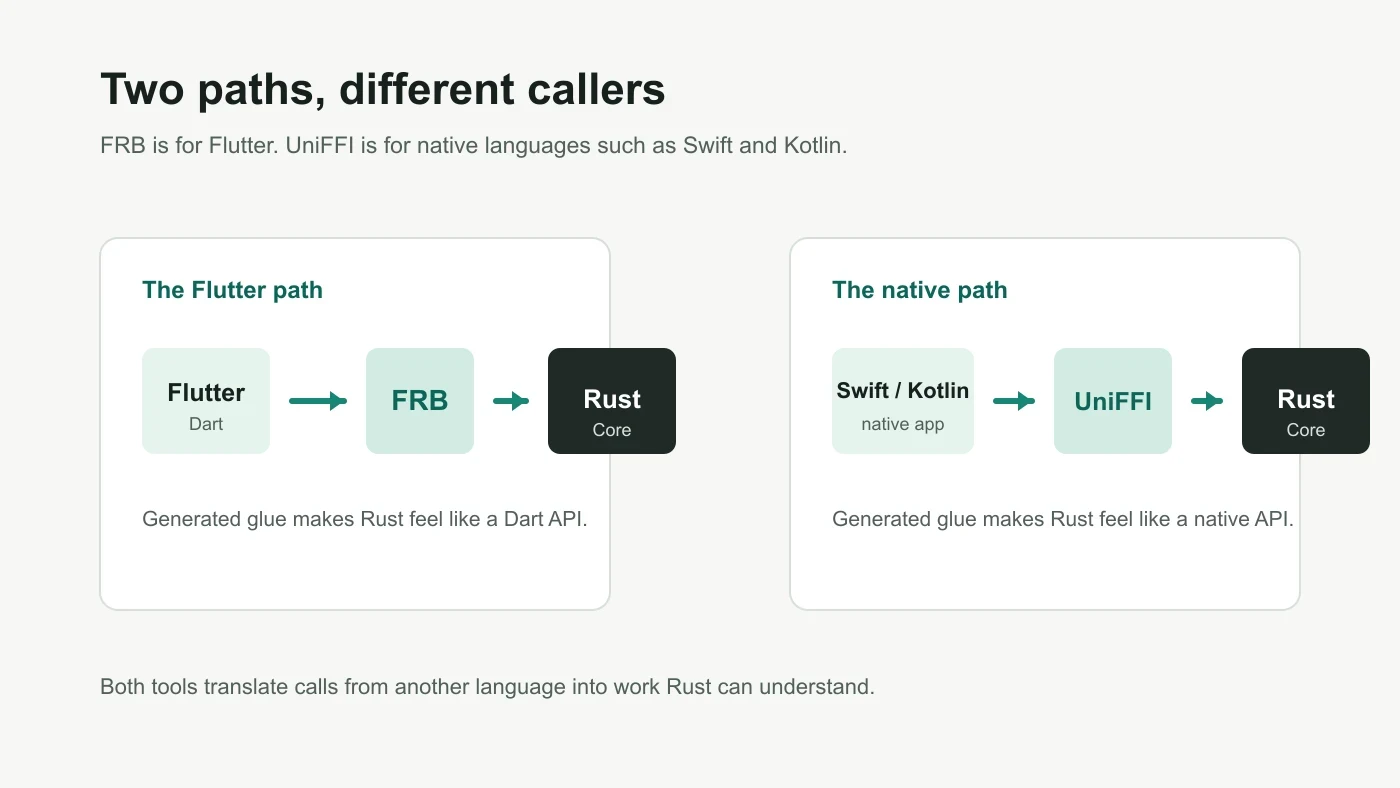
The short answer: choose FRB when Flutter is your main client. Start with UniFFI when Swift or Kotlin is your main client. The rest of this article explains why.
Why can Flutter not call Rust directly?
Imagine a music player written in Flutter. You want Rust to handle encryption, audio analysis, file scanning, or a set of rules that both iOS and Android can share.
Flutter is mainly written in Dart, so Rust code cannot be called as if it were ordinary Dart:
final result = rustFunction();You need a translation bridge in between. It turns Dart, Swift, or Kotlin arguments into values Rust understands, then turns Rust results back into values the caller understands. This is called FFI: different programming languages calling one another.
flutter_rust_bridge and UniFFI build that bridge for you. They generate repetitive connection code, so you do not need to hand-write C interfaces, memory cleanup, and a large collection of type conversions.
Start here: what is your app written in?
If your app uses Flutter and Rust will mostly be called from Flutter, start with flutter_rust_bridge. It is usually the easiest path.
If you want Rust code to be called directly from Swift on iOS, Kotlin on Android, or languages such as Python, look at UniFFI first. It is closer to packaging Rust as a library for several languages.
| Your situation | Better fit |
|---|---|
| The app UI is written in Flutter | flutter_rust_bridge |
| You need Rust in a SwiftUI or native iOS project | UniFFI |
| You need Rust in a native Kotlin Android project | UniFFI |
| You only need a small amount of Flutter-to-Rust functionality | flutter_rust_bridge |
| The same Rust code serves Flutter and native apps | FRB for Flutter, UniFFI for native apps |
FRB is the common short name for flutter_rust_bridge and is used for the rest of the article.
FRB: the straightforward Rust entry point for Flutter
FRB has one clear job: help Flutter and Rust work together.
From Rust to Flutter, usually in three steps
In a typical FRB project, you do three things:
- Write public functions and data types in Rust.
- Run the FRB generation command.
- Call the generated API from Dart.
Here is a small Rust function that greets a user:
pub struct Greeting {
    pub message: String,
}

pub async fn greet(name: String) -> Result<Greeting, String> {
    if name.trim().is_empty() {
        return Err("Name cannot be empty".to_owned());
    }

    Ok(Greeting {
        message: format!("Hello, {name}!"),
    })
}
After generation, Dart gets an API it can call. It feels close to ordinary asynchronous Dart:
final greeting = await api.greet(name: 'Yulin');
print(greeting.message);
That is FRB’s strength. A Flutter developer does not first need to learn Swift, Kotlin, or low-level C FFI. Rust async functions usually become Dart Future values, while continuously changing data can be received through Dart Stream values.
For example, when Rust processes a batch of images, Flutter can receive updates such as “20% complete” and “40% complete” through a stream or callback. Your existing state management, FutureBuilder, and StreamBuilder patterns can continue to work.
UniFFI: making Rust feel like a native Swift or Kotlin library
UniFFI starts with a different idea: define a Rust API clearly, then generate an interface that feels familiar in each target language.
It is common when the core logic lives in Rust while iOS calls it from Swift and Android calls it from Kotlin. The two platforms do not have to reimplement the same network protocol, encryption algorithm, or business rule.
From Rust to native clients, declare the public interface first
UniFFI asks you to be more explicit about which Rust types can be used outside Rust. Here is the same greeting example:
#[derive(uniffi::Record)]
pub struct Greeting {
    pub message: String,
}

#[derive(Debug, thiserror::Error, uniffi::Error)]
pub enum GreetingError {
    #[error("Name cannot be empty")]
    EmptyName,
}

#[uniffi::export(async_runtime = "tokio")]
pub async fn greet(name: String) -> Result<Greeting, GreetingError> {
    if name.trim().is_empty() {
        return Err(GreetingError::EmptyName);
    }

    Ok(Greeting {
        message: format!("Hello, {name}!"),
    })
}
For now, you can read the annotations this way:
Record: ordinary named data, similar to a Dart class or Swift struct.Error: an error type that another language can recognize.export: tells UniFFI to generate an interface for this function.
After UniFFI generates Swift bindings, an iOS developer can call it in a familiar style:
do {
    let greeting = try await greet(name: "Yulin")
    print(greeting.message)
} catch {
    print("Something went wrong")
}
The Swift developer sees familiar async and try, rather than Rust’s Result. This is UniFFI’s main value: Rust can feel more like a library written for the target language.
The real difference is not performance. It is the caller.
The table below is more useful than looking only at supported languages:
| Question | FRB | UniFFI |
|---|---|---|
| Primary audience | Flutter and Dart developers | Swift, Kotlin, Python, and similar clients |
| Dart and Flutter experience | Natural. This is its main job. | Not its main target. |
| Swift and Kotlin experience | Not its main target. | Natural. This is its main job. |
| Rust-side style | Generate Dart APIs from public Rust APIs | Mark the types and functions that can be exported |
| Async result | Usually becomes a Dart Future | Becomes the target language’s async style, such as Swift async throws |
| Ongoing events | Dart Stream or callbacks | Usually a callback interface mapped to the target language |
| Best project fit | Flutter-first apps | Native multi-platform apps sharing a Rust core |
Performance is usually not the first reason to choose one. In most real apps, networking, disk access, image decoding, and UI rendering cost much more time than this bridge. Ask this first instead: who will call Rust, and does the team mainly maintain Flutter or Swift/Kotlin?
Data is where cross-language code most often goes wrong
Not every Rust type is a good fit for Dart or Swift. Treat cross-language data like an API response: the clearer its fields are, the easier it is to maintain.
| Good data to send to Dart or Swift | Things that should stay inside Rust |
|---|---|
| Strings, numbers, and booleans | Database connections and HTTP clients |
| Optional values, such as a missing avatar | File handles and thread locks |
| Lists, such as search results | Running background tasks |
| Fixed-field users, songs, or orders | Platform objects such as Flutter BuildContext or Swift UIViewController |
| A small set of states, such as loading, success, and failure | Objects tightly bound to a specific runtime |
The right-hand column is closely tied to its environment. Passing it into another language often creates hard-to-debug problems around release timing, threads, or crashes.
Do not spread Rust’s internal state across the UI
Sometimes you need more than one function call. You may have a search service, download manager, playback queue, or local database that lives for a long time.
Do not expose every internal field. Treat the Rust object as a black box: another language can call the methods it offers, while Rust manages locks, caches, and background tasks.
In UniFFI, a small example looks like this:
#[derive(uniffi::Object)]
pub struct Counter {
    value: std::sync::Mutex<i64>,
}

#[uniffi::export]
impl Counter {
    #[uniffi::constructor]
    pub fn new(initial: i64) -> Self {
        Self {
            value: std::sync::Mutex::new(initial),
        }
    }

    pub fn increment(&self) -> i64 {
        let mut value = self.value.lock().expect("counter lock");
        *value += 1;
        *value
    }
}
Swift or Kotlin can create and use Counter, but cannot directly change Rust’s internal value. FRB offers a similar way to hold Rust objects without exposing their internals.
In a real project, complete actions are usually better than a long list of getters and setters:
downloadManager.start(task)
downloadManager.cancel(taskId)
player.replaceQueue(tracks)
player.pause()
The other language says what it wants to do. It does not need to know how Rust stores data, locks it, or schedules work.
What if Rust needs a system service in return?
Rust should not own everything. These are usually platform jobs:
- reading a password from Keychain or secure storage;
- asking for camera, notification, or file permissions;
- using the system media player;
- navigating to a page or showing an alert;
- choosing a file or photo.
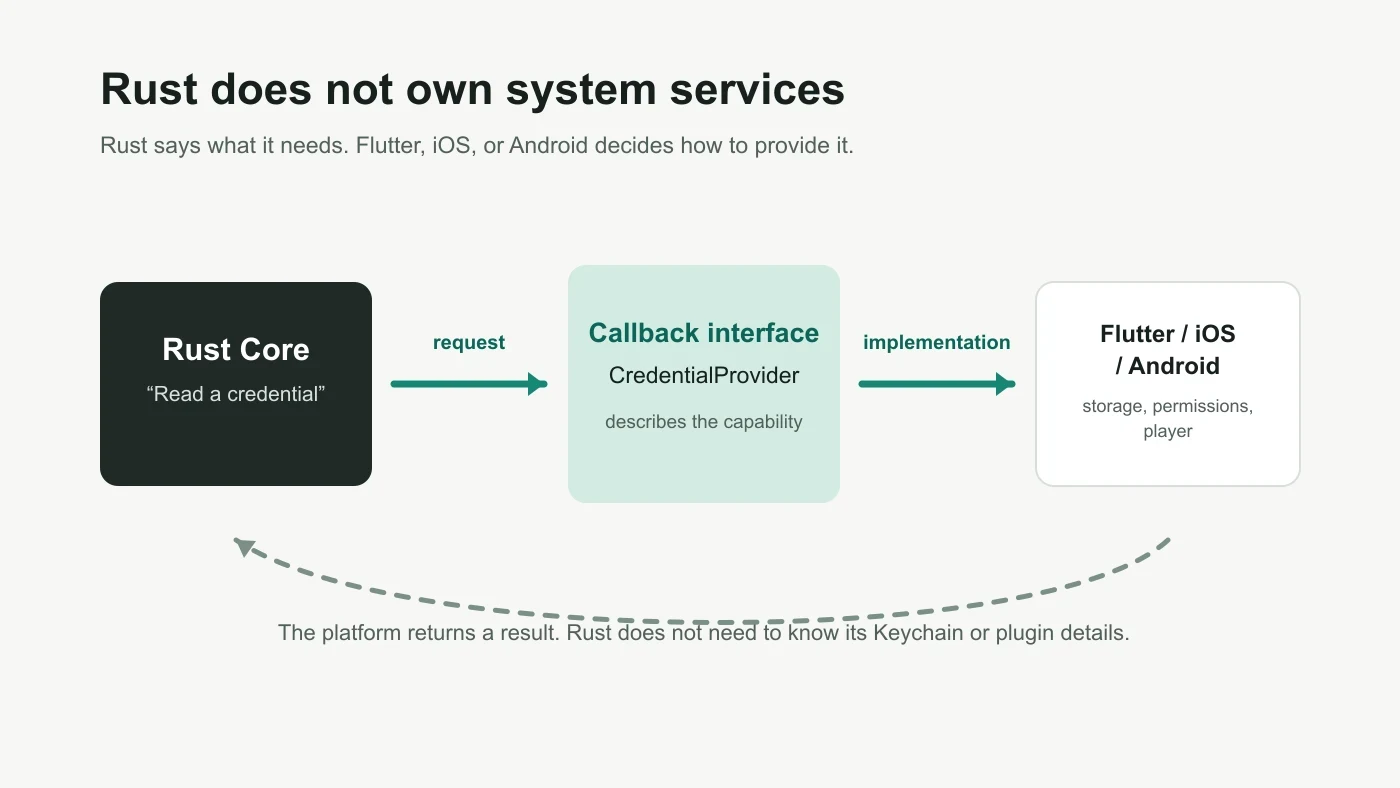
Rust can ask one small question, such as “retrieve a password for this credential reference”, and let the application answer it.
UniFFI can declare that callback interface like this:
#[uniffi::export(callback_interface)]
pub trait CredentialProvider: Send + Sync {
    fn password(&self, credential_ref: String) -> Option<String>;
}
Think of this as Rust defining a socket. iOS can plug in Keychain, while Flutter can plug in secure storage. Rust does not need to know how each platform implements it.
FRB can also move callbacks and data streams between Rust and Dart. The exact code varies by FRB version and use case, but the principle is the same: a callback should do one clear, small job. Do not let Rust use a callback to control page navigation, widgets, or animations. The UI should still own those.
Do not return only “something went wrong”
It is easy to start with Result<T, String>, which means returning one sentence when something fails. Once an app needs to distinguish a lost connection, a wrong password, and a timeout, a sentence alone is not enough.
Return an error category as well as a short explanation:
code: unauthorized
message: Please sign in again
retryable: false
Or:
code: network
message: Network is unavailable
retryable: true
Flutter, Swift, and Kotlin can then use code to choose between a sign-in screen, retry button, or ordinary message. They do not need to guess from error wording. With either FRB or UniFFI, never include passwords, tokens, authenticated URLs, or database paths in an error message.
Code generation is only half the integration
Generated bridge code does not mean integration is a one-click task. Before starting, you will usually need:
- A Rust project that builds and tests on its own.
- Pinned generator versions so different team members get the same output.
- Rust compilation targets for iOS, Android, or desktop.
- One clear generation command in a script or CI.
- A rule not to edit generated files by hand: change the Rust API, then generate again.
- A handwritten Dart, Swift, or Kotlin service that keeps generated APIs away from UI pages.
The last point is especially useful. Calling generated code from a page is fine at first, but generator upgrades, API changes, and error-type changes can later touch many pages. Putting a RustService, repository, or client around generated APIs makes that future work easier.
Choose in one sentence, then begin
FRB and UniFFI both help Rust talk to other languages, but they serve different primary callers: FRB understands Flutter best, while UniFFI understands native languages such as Swift and Kotlin best.
As a beginner, decide based on your client rather than trying to find one tool for every platform too early. Use FRB well in a Flutter project. Use UniFFI well in a native multi-platform project. Most importantly, keep the cross-language API simple: pass clear data, return actionable errors, let Rust manage its internal state, and let the UI manage pages and interaction.
Use this checklist before you start:
- Is the main Rust caller Flutter, or Swift/Kotlin?
- Does the cross-language API pass only simple, clear data?
- Do errors have categories instead of only text?
- Are Rust state and UI page state managed separately?
- Is generated code kept behind a handwritten service or client?