

August 16, 2026 · 13 min read
One HTTPS, Two Capture Paths: Native vs Flutter
The same goal — seeing an app's HTTPS traffic — plays out very differently on native Android and Flutter: certificate trust, traffic redirection, and hostname verification each fail at a different point. Ends with a complete reusable capture flow you can follow next time.
The same goal, two different roads
In app protocol analysis, the thing I do most often is figure out what an app is actually saying to its server.
It sounds simple, but it forks fast. For the same HTTPS plaintext, native apps and Flutter apps go in completely opposite directions. A native app is basically done once you swap in a certificate and hook up a proxy; a Flutter app can burn a whole day — and usually trips over the same trap: mistaking “the certificate doesn’t match the hostname” for “the certificate is pinned.”
This post isn’t about any specific app. It only records the capture approach for each architecture and the pitfalls I hit. No real domains, credentials, device IDs, or health data — API addresses are replaced.
No matter which road, TLS capture boils down to three questions:
- Will the traffic come to you? — Does the app’s connection go through your proxy?
- Is your certificate trusted? — Does the client accept the certificate you sign?
- Does the name on the certificate match? — Does it match the hostname the app connects to?
The “SSL proxying” switch in tools is really just solving those three at once. The difference between native and Flutter lives in which question trips first.
Native apps: system proxy + system-level CA
Native apps usually use OkHttp-style networking libraries, and those libraries have one very obedient habit: they honor the system global proxy.
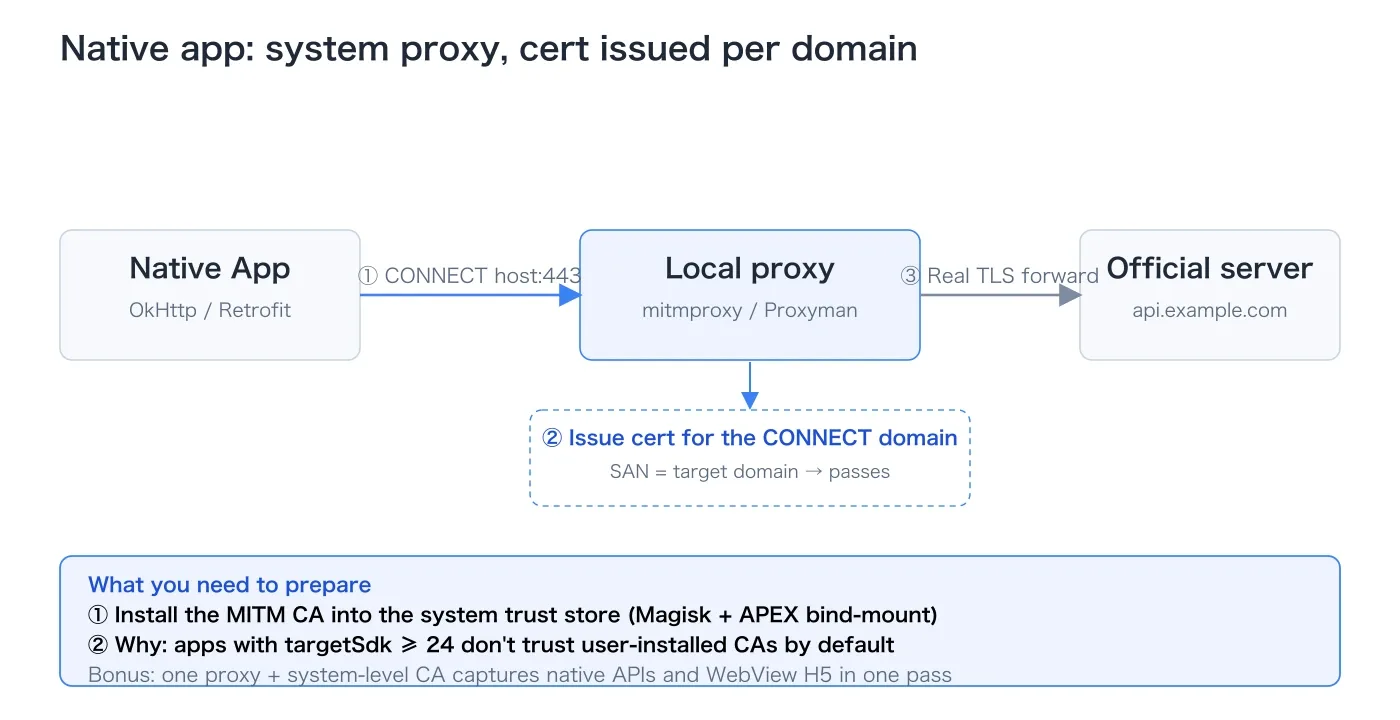
Traffic: the proxy issues a cert for each domain automatically. Every time the app sends an HTTPS request, it tells the proxy “I want to connect to example.com:443”. The proxy sees the domain, signs a fresh certificate with its own CA, and TLS is up.
So the first question is basically free: the traffic comes to you, and the proxy issues the cert with the real domain name. Two commands:
# Phone reaches the Mac-side proxy through a USB reverse tunnel
adb reverse tcp:9090 tcp:9090
# Set the global HTTP proxy
adb shell settings put global http_proxy 127.0.0.1:9090
Run a TLS-decrypting proxy on the Mac (Proxyman or mitmproxy both work) listening on 9090. In theory, you’re done.
The snag: installing the CA into the “user cert” store does nothing. The “in theory” usually dies at the second step. I installed the proxy CA into Android’s user certificate store and still couldn’t decrypt. One sentence explains it:
Starting with Android 7 (API 24), apps no longer trust user-installed certificates by default.
Unless the app explicitly allows user certificates in its network security config (base-config with certificates src="user"), it only trusts the system certificate store. No matter how many certs you add to the user store, they’re air to the app — every request fails the handshake, and the proxy only sees connections drop.
So for the native path, the CA has to go to the system level.
System-level CA: a Magisk module that takes effect at boot. The trouble starts with Android 14. The system certificate directory moved into a partition that is read-only at runtime and restored on every update (APEX). You can’t just edit it. The right move is a Magisk systemless module that mounts a merged certificate directory over it early at boot:
/data/adb/modules/mitm_ca_systemless/
├── module.prop
├── post-fs-data.sh
└── system/etc/security/cacerts/<ca-hash>.0
The idea in one line: at boot, merge the system certs and my cert into one directory, then bind-mount it over the APEX certificate directory.
# post-fs-data.sh: merge the system and APEX certs, then bind-mount over APEX
mkdir -p merged_conscrypt_cacerts
cp /system/etc/security/cacerts/* merged_conscrypt_cacerts/
cp /apex/com.android.conscrypt/cacerts/* merged_conscrypt_cacerts/
mount -o bind merged_conscrypt_cacerts /apex/com.android.conscrypt/cacerts
After a reboot the CA is visible in the system trust store and the native path works.
Hybrid apps: one setup catches everything. Many native apps are hybrids: core business goes over native APIs, while activity- and benefits-style pages load remote H5 in a WebView. Good news: H5 uses the system network stack too and doesn’t build its own. One proxy + one set of system CAs captures native APIs and H5 at the same time.
About Frida: don’t fight it. Some native apps carry anti-debugging protection (DEX hardening, native anti-debug libraries — all of them), and Frida gets the process killed the moment it attaches. But capture is “swap a certificate + redirect traffic”, purely passive observation; Frida is “inject + change behavior”, active intervention. An app can defend against active intervention and still not defend against a CA it thinks it can trust.
Flutter apps: bypass the proxy, certificates on their own terms
Flutter is another world. The same proxy setup, and the results are night and day.
First wall: it doesn’t use the system proxy at all. Proxy and reverse tunnel in place, other apps’ traffic is visible in full — except the Flutter app’s target domain shows nothing.
The reason lives in Flutter’s networking: it uses Dart’s own stack, TLS (BoringSSL) compiled straight into libflutter.so. It creates its own sockets and verifies its own certs, and ignores Android’s global proxy. A cold-start Frida probe of libflutter.so reveals its own set of entry points:
SecureSocket_Connect
SecureSocket_Handshake
SecureSocket_RegisterBadCertificateCallback
SecurityContext_TrustBuiltinRoots
The upload path is closed inside the Dart layer too, so the usual tricks — hooking OkHttp, patching the Java TrustManager — mostly do nothing here. For Flutter, the proxy path is simply a dead end.
Second wall: traffic arrives, but dies at the certificate stage. If it won’t use the proxy, force it. Use iptables to yank the target domain’s 443 traffic to the local machine:
adb reverse tcp:9443 tcp:9443
adb shell "su -c 'iptables -t nat -A OUTPUT -p tcp -d <IP> --dport 443 -m comment --comment TLS_CAPTURE -j DNAT --to-destination 127.0.0.1:9443'"
It worked at the network layer: iptables counters hit, connections showed up on the Mac. But capturing the loopback port showed a fixed death pattern:
ClientHello
  → ServerHello / certificate
  → client immediately FIN
The client kills the connection at the certificate stage, before any HTTP plaintext. The easiest mistake here is reading it as certificate pinning and diving into BoringSSL’s verification callbacks.
First, tell apart pinning from a hostname mismatch. I didn’t guess. I connected to the redirected endpoint and looked at what cert it was actually sending:
openssl s_client -connect 127.0.0.1:9443 </dev/null 2>/dev/null | openssl x509 -noout -text | grep -A1 "Subject Alternative Name"The result was obvious:
Subject Alternative Name:
  DNS:localhost
  IP Address:0.0.0.0
  IP Address:127.0.0.1
There it was. The app wants api.example.com, but the endpoint — because it listens on localhost — sends a localhost certificate by default. And the probe hit SecurityContext_TrustBuiltinRoots, meaning Dart uses the system root store — once the proxy CA is in the system trust store, the chain itself is fine.
A trusted chain is not the same as the right name. The chain verifies, but the SAN (the domain written on the certificate) doesn’t match, and Dart closes the connection anyway. That’s the root cause.
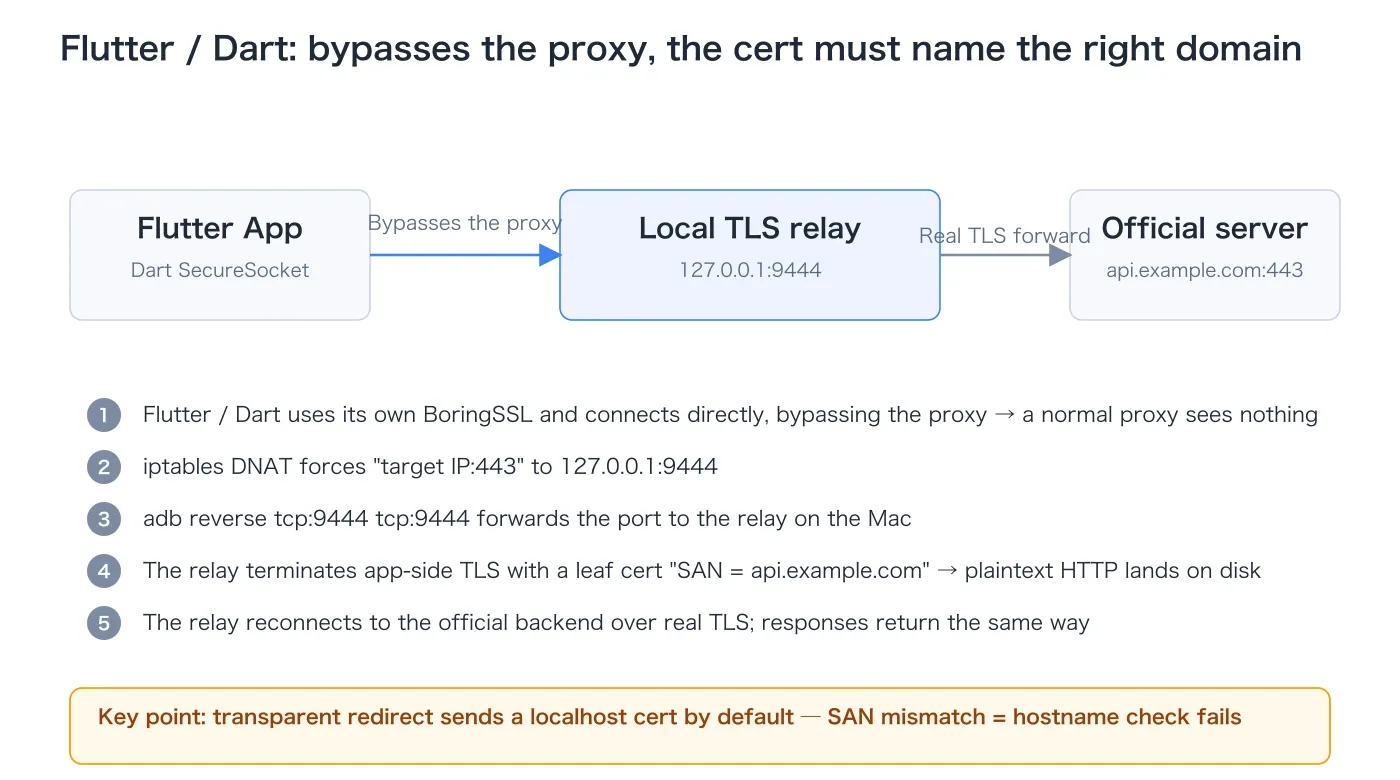
The fix: a local TLS relay that can “say the right domain”. Since the problem is the certificate not stating which domain it speaks for, write your own terminating endpoint that can say the right domain. Three steps:
① Issue a certificate for local analysis only. Using the proxy CA’s private key (already in the system trust store), sign a certificate whose SAN is api.example.com:
Subject CN: api.example.com
Subject Alternative Name: DNS:api.example.com
Issuer: proxy CA
② Run a local TLS relay. It listens on 127.0.0.1:9444: on the app side it’s a TLS server for api.example.com (using that certificate), on the server side it’s an ordinary TLS client (reconnecting to api.example.com:443 with real TLS), and it saves both byte streams in between.
③ Redirect the traffic. Resolve the domain’s current IPs, add a DNAT rule per IP, then set up adb reverse:
adb reverse tcp:9444 tcp:9444
adb shell "su -c 'iptables -t nat -A OUTPUT -p tcp -d <IP> --dport 443 -m comment --comment TLS_CAPTURE -j DNAT --to-destination 127.0.0.1:9444'"
With this relay, the handshake goes through instantly, plaintext requests and responses land on disk, and the app works normally. The Flutter path is now open.
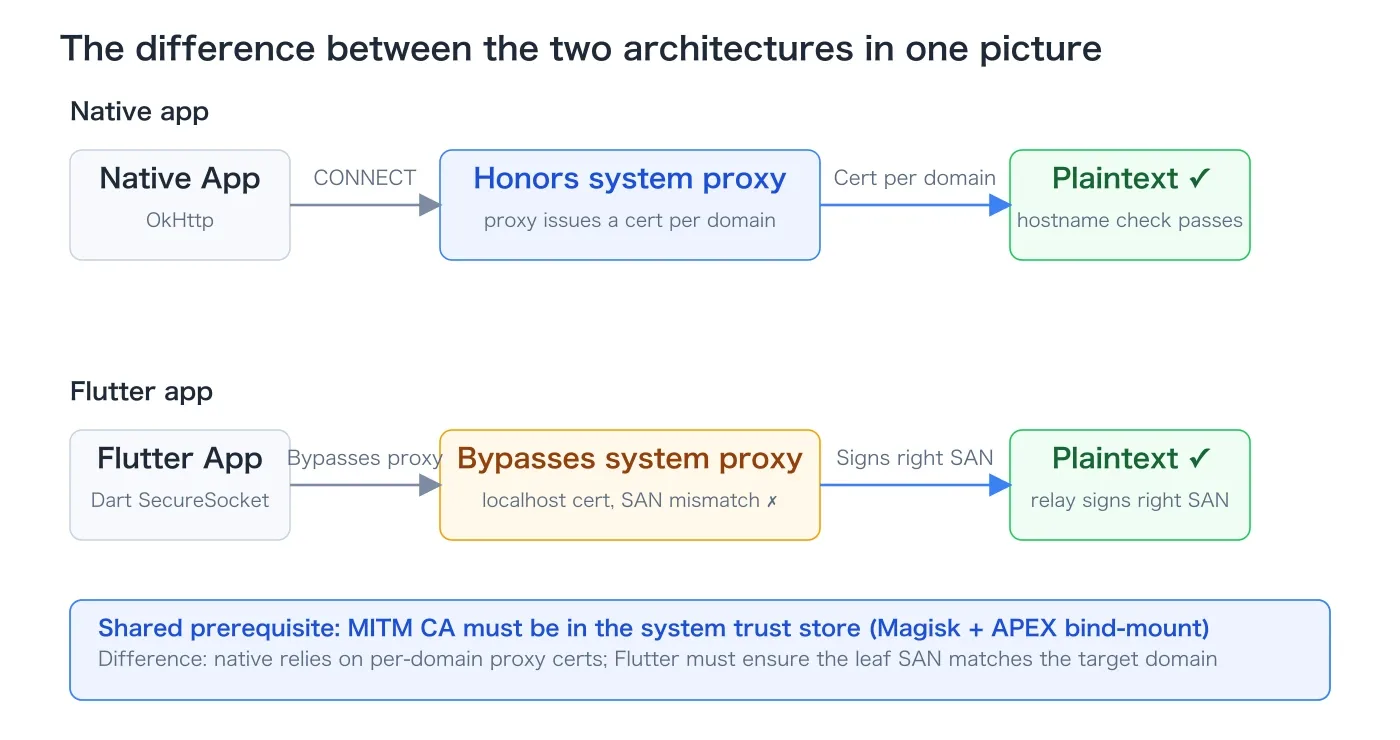
The difference between the two architectures
| Network stack | Honors system proxy | Certificate trust source | Typically seen in |
|---|---|---|---|
| Native OkHttp / Retrofit | Yes | System CA | Kotlin native apps |
| WebView-loaded H5 | Yes | System CA | Activity/benefits pages inside native apps |
| Flutter Dart network stack | No | System built-in roots | Flutter apps |
| React Native (Android) | Yes (OkHttp underneath) | Same as OkHttp | RN apps |
The difference in one sentence: native has to solve “how traffic reaches you”, Flutter has to solve “how a certificate proves it’s you”. iOS follows the same principles, except the phone and Mac connect over USB forwarding instead of adb reverse. Both cases in this post are Android; I didn’t verify the iOS details.
Complete reusable flow: just follow it next time
Here’s the full flow you can copy directly: four steps — pick the path, prepare, capture via A or B, roll back. Commands run as-is; replace api.example.com with the actual target domain.
Step 1: 30 seconds to pick a path
Look at the network stack from the APK/DEX. Whether libflutter.so exists decides everything after:
| What you see | Conclusion |
|---|---|
libflutter.so | Flutter/Dart, its own network stack → Flutter path |
Lokhttp3/, Lretrofit2/ | Native OkHttp → Native path |
libreactnative.so | RN (OkHttp underneath on Android) → Native path |
Custom BaseWebView | Has H5 pages; the native path covers them |
| Native API + WebView H5 | Both; native-path settings cover the H5 |
unzip -l app.apk | grep -E "libflutter|libreactnative"   # look for native libraries
unzip -p app.apk classes.dex | strings | grep -m3 -E "Lokhttp3/|Lretrofit2/"   # look for the network stack
Also decide where the CA goes: unpack network_security_config. No base-config → the CA must be system-level; if it has certificates src="user" → a user CA is enough and you can skip Magisk.
Step 2: Preparation
A rooted device with Magisk, adb reachable, and a proxy CA with its private key (Proxyman or mitmproxy PEM). Installing a system CA needs a filename, so note the hash first:
openssl x509 -in <ca.pem> -noout -subject_hash_oldStep 3: Native app — copy these
# ① Set the global proxy + USB reverse tunnel (proxy on the Mac listens on 9090)
adb reverse tcp:9090 tcp:9090
adb shell settings put global http_proxy 127.0.0.1:9090

# ② Install a system-level CA: a Magisk systemless module that bind-mounts a merged
#    directory over /apex/com.android.conscrypt/cacerts (Android 14+) at boot, with a <hash>.0 file inside
adb push <module_dir> /data/adb/modules/
adb reboot

# ③ Verify: drive the app; the proxy should show the target domain's plaintext
#    Hybrid apps: native APIs and H5 captured in one go

# ④ Roll back
adb shell settings put global http_proxy :0
adb reverse --remove tcp:9090
adb shell "su -c 'touch /data/adb/modules/<module-name>/remove'"
adb reboot
Step 4: Flutter app — copy these
# ① Confirm the Dart stack (is libflutter.so present?)
unzip -l app.apk | grep libflutter

# ② Transparently redirect traffic to the local machine (verify the network layer first)
adb reverse tcp:9444 tcp:9444
dig +short api.example.com          # note the current IP (A record)
adb shell "su -c 'iptables -t nat -A OUTPUT -p tcp -d <IP> --dport 443 -m comment --comment TLS_CAPTURE -j DNAT --to-destination 127.0.0.1:9444'"

# ③ Find the breakpoint: look at the SAN of the cert the redirected endpoint sends
#    — tell apart "hostname mismatch" from "real pinning"
openssl s_client -connect 127.0.0.1:9444 </dev/null 2>/dev/null | openssl x509 -noout -text | grep -A1 "Subject Alternative Name"
#   SAN is localhost / 127.0.0.1 → hostname mismatch, not pinning

# ④ Sign a certificate with SAN = target domain, using the already-trusted proxy CA
openssl req -new -newkey rsa:2048 -nodes \
  -keyout api.example.com.key -out api.example.com.csr -subj "/CN=api.example.com"
openssl x509 -req -in api.example.com.csr \
  -CA <ca.pem> -CAkey <ca.key> -CAcreateserial \
  -out api.example.com.crt -days 7 \
  -extfile <(printf "subjectAltName=DNS:api.example.com\nkeyUsage=digitalSignature,keyEncipherment\nextendedKeyUsage=serverAuth")

# ⑤ Run a local TLS relay: terminate TLS on the app side with that cert → save plaintext → forward upstream over real TLS
python3 tls_relay.py --listen-port 9444 --remote-host api.example.com \
  --cert api.example.com.crt --key api.example.com.key --out-dir captures/

# ⑥ Final redirect. IPs change, so re-dig and update the DNAT before each capture
adb shell "su -c 'iptables -t nat -A OUTPUT -p tcp -d <newIP> --dport 443 -m comment --comment TLS_CAPTURE -j DNAT --to-destination 127.0.0.1:9444'"

# ⑦ Verify + roll back
# Verify: the relay's saved plaintext parses as HTTP and the app works normally
adb shell "su -c 'while iptables -t nat -S OUTPUT | grep -q TLS_CAPTURE; do iptables -t nat -D OUTPUT 1; done'"
adb reverse --remove tcp:9444
Step 5: Symptom → cause → fix
| Symptom | Root cause | Fix |
|---|---|---|
| Proxy sees nothing for the target domain; other apps work | App bypasses the system proxy | Transparent redirect |
| Traffic reaches the endpoint but no plaintext | Client kills the connection at the certificate stage | Check the SAN; sign the cert with the right SAN |
ClientHello → ServerHello/cert → FIN | Certificate hostname mismatch | Not pinning; fix the SAN first |
| SAN correct, chain trusted, still rejected | Real pinning | Only then hook the client’s verify callback |
| Handshake fails under the global proxy | Release build doesn’t trust user CAs | System-level CA (Magisk) |
| iptables counter doesn’t move | DNAT not active / IP changed | Re-resolve the A record, check the OUTPUT chain |
Roll-back checklist (run when done)
adb shell settings put global http_proxy :0                                  # clear the global proxy
adb reverse --remove tcp:9444; adb reverse --remove tcp:9090; adb reverse --remove-all   # clear reverse tunnels
adb shell "su -c 'while iptables -t nat -S OUTPUT | grep -q TLS_CAPTURE; do iptables -t nat -D OUTPUT 1; done'"   # clear DNAT
adb shell "su -c 'touch /data/adb/modules/<module-name>/remove'"; adb reboot       # remove the system-level CA
Key takeaways
- Picking the network stack is the most important step: whether
libflutter.soexists decides everything after it. - A user CA ≠ a system CA: since Android 7 apps trust only the system store by default; a user-store CA is a waste.
- Traffic reaching the endpoint ≠ the cert being right: redirection only proves the network layer; a wrong SAN still kills the handshake. Always connect and look at the cert.
- A hostname mismatch ≠ pinning: on
ClientHello → ServerHello/cert → FIN, check the SAN first; don’t dive into verification callbacks. - The target domain’s IP changes: re-
digbefore every capture, or the DNAT silently goes stale. - Pin ALPN to
http/1.1: on both ends of the relay, to keep HTTP/2 parsing out of the way. - If the app has hardening, don’t fight Frida: passive MITM is the right move on native apps.
- Keep only method / path / field names / structure as plaintext evidence; tokens, device IDs, and real response bodies stay local.
Wrong turns I took
Treating a hostname mismatch as pinning. Seeing “the connection is killed at the certificate stage”, my first instinct was pinning, and I burned time hooking BoringSSL’s verification callbacks. The CA chain was trusted all along — the SAN just didn’t match. The distinction is simple: pinning is SAN correct + chain trusted and the client still rejects; a hostname mismatch is the certificate’s SAN not being the domain the client asked for. openssl s_client shows it in one look.
Verifying “did the traffic arrive” but not “what does the certificate look like”. At the redirect step, iptables counters hit and connections appeared, so I assumed it was almost done. The traffic arrived, but the certificate was wrong — useless. From now on, with redirect-based capture I separate “connection arrived” from “certificate content”.
Assuming the user certificate store was enough. On the native side I first put the CA into the user store and thought it was done. Since Android 7 the default is to distrust user CAs; without installing to the system level, a release build will never accept it.
Trying to brute-force Frida against anti-debugging. The hardening library blocked Frida completely. But for “see the plaintext”, Frida was never required — passive MITM is. Distinguishing “observe” from “modify” saves a lot of time.
Looking back
Looking back, my original mental model was “set up a proxy, swap a certificate, maybe deal with pinning.” The real determinant turned out to be what each architecture assumes about two things: which path the traffic takes, and whose identity a certificate represents.
Native apps stand on the common path: the proxy knows who they connect to, issues a cert for the domain, and everything is natural. Flutter takes “who is the TLS peer” back from the framework — so you have to fill in the identity yourself: the certificate you send has to convince it that you are that domain.
A trusted certificate chain has never meant a trusted hostname; traffic reaching the endpoint has never meant the certificate will be accepted. Breaking those three questions apart and verifying each one step by step is worth more than remembering any tool’s buttons.