June 10, 2026 · 11 min read
Debugging Missing Purchase Events From Flutter Facebook App Events in Android Release Builds
A debugging note for a facebook_app_events issue where debug/profile builds worked, but Android release builds only reported install events and lost purchase/subscription events. The root cause is explained through R8 reachability analysis, dynamic calls, and keep rules.
Background
Recently, while integrating facebook_app_events into a Flutter project, I ran into a problem that was not immediately obvious.
After purchases and subscriptions completed, we reported events to Facebook App Events. During development, everything looked normal: the debug build showed purchase and subscription events, and the profile build also showed them. But after switching to the official release build, the backend only showed install-related events. Purchase and subscription events were completely missing.
The more troublesome part was that the app itself did not crash, the purchase flow completed normally, and Facebook-related network requests did not disappear entirely. In other words, the user-facing feature worked, and the SDK was not completely unavailable. Only key events such as purchase and subscription silently disappeared in the release build.
This symptom is important. If the Facebook appId, client token, backend configuration, or event parameters were fundamentally wrong, install events usually would not appear normally either. If the business code were simply wrong, the issue should not happen only in release. The more suspicious signal was this: the same source code produces different Android artifacts under different build types, and different event types may travel through different internal SDK paths.
Symptoms
The issue can be simplified into this table:
| Build type | Typical release optimization enabled? | Install event | Purchase/subscription event |
|---|---|---|---|
debug | No | Visible | Visible |
profile | Usually not equivalent to full release optimization | Visible | Visible |
release | Yes | Visible | Missing |
This is not a normal “analytics call was not executed” problem.
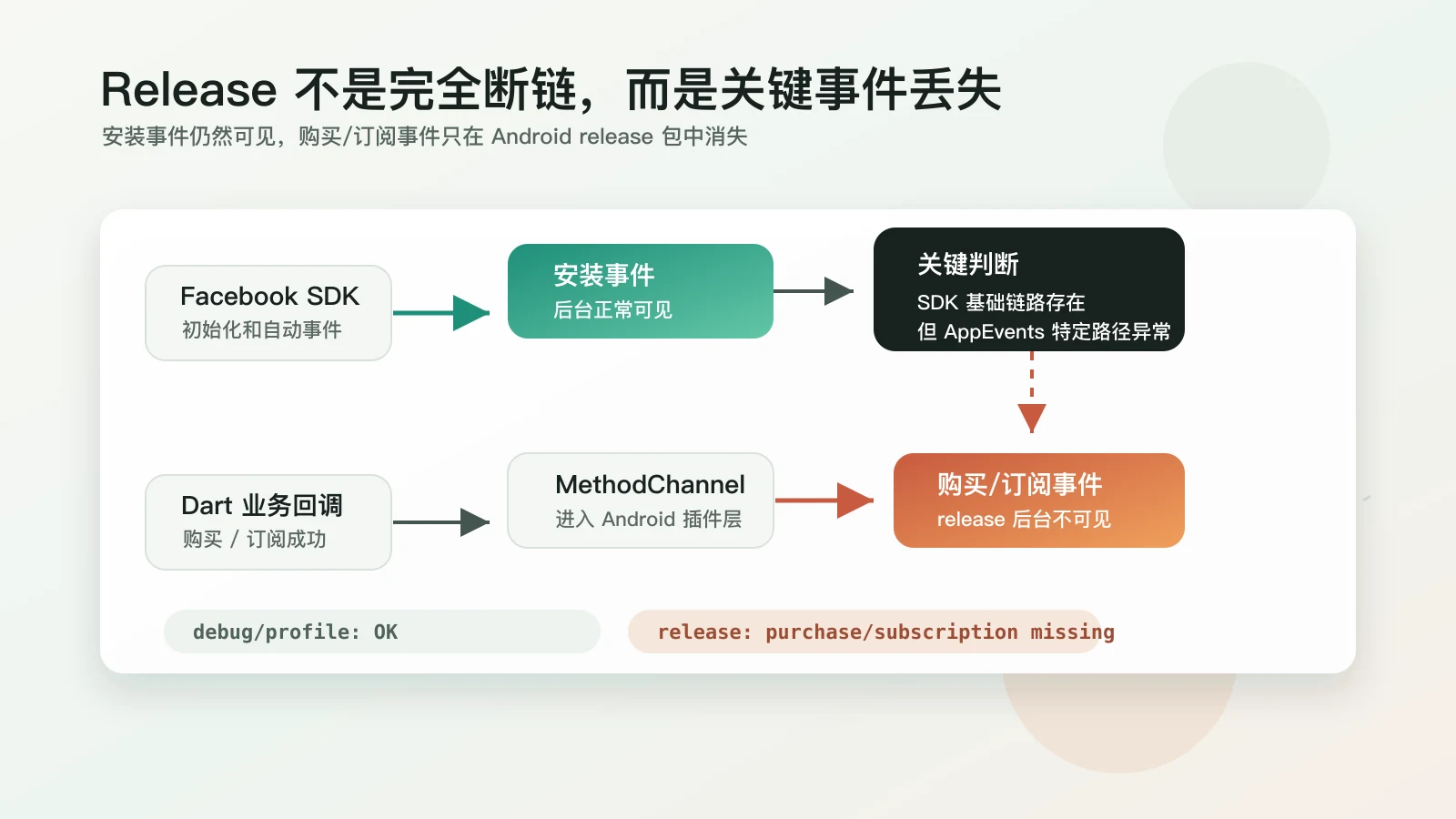
If the Dart layer did not call the event at all, all three build types should be affected. If SDK initialization completely failed, install events should not appear either. The current behavior is more like this: Facebook SDK initialization and some automatic events still work, but the purchase/subscription event path is broken in the release artifact.
In a Flutter project, a Facebook App Events report roughly goes through this chain:
Facebook SDK initialization / automatic events
  -> install/startup related events
  -> Facebook backend

Dart purchase/subscription success callback
  -> facebook_app_events Flutter plugin
  -> MethodChannel
  -> Android plugin layer
  -> Facebook Android SDK AppEventsLogger
  -> App Events queue / batch upload
  -> Facebook backend
The install event exists, so the SDK is not completely absent and the network is not completely broken. Purchase/subscription events work in debug and profile, so the Dart call entry, MethodChannel, basic configuration, and event parameters are generally valid. If only release loses purchase/subscription events, the Android bytecode produced by the release build is more likely to have broken some SDK-internal classes, methods, or metadata related to AppEvents.
Debugging Process
I did not start by changing obfuscation rules. First, I ruled out several more common causes.
Call Timing
First, I checked the code path after purchase and subscription success, and confirmed that the event was triggered after the transaction completed, not during page initialization, product loading, or payment dialog display.
This step mainly avoids mistaking “the event was never triggered” for “the SDK did not report it”. After checking, the event calls inside purchase and subscription callbacks were reached consistently.
Parameters and Environment
Next, I checked event parameters: amount, currency code, event name, subscription-related fields, as well as the Facebook appId, client token, and manifest configuration on Android.
If these configurations were wrong, the issue usually would not appear only in release, and it would be unlikely to affect only purchase/subscription while leaving install events intact. So when debug/profile both showed backend data and release still had install events, these items became lower priority.
Packet Capture
I also tried using a packet capture tool to observe the release build’s network behavior. The result was subtle: Facebook-related domain requests were visible, so the app was not completely disconnected from Facebook’s network path.
But I could not inspect the request body and response body reliably. The test device was rooted and had a custom system certificate installed. Once SSL interception was enabled, the related HTTPS requests failed, so detailed payload and server responses could not be observed stably.
Therefore, packet capture could only serve as supporting evidence, not a final conclusion:
- Seeing Facebook domain requests mostly rules out “no network request at all”;
- Not seeing the detailed payload does not prove purchase/subscription events were actually sent to the server;
- SSL interception causing requests to fail does not directly prove the SDK itself is broken, because the TLS path has already been changed.
In other words, packet capture told me this: the SDK was not completely offline, but whether purchase/subscription events entered the correct reporting queue was still unknown. This pushed the investigation further toward release artifact differences rather than a simple network explanation.
Build Differences
Finally, I looked at what was unique to release. Android release packages commonly enable code shrinking, obfuscation, optimization, and resource shrinking. So I ran a direct experiment: temporarily disable shrinking and resource cleanup for release.
minifyEnabled false
shrinkResources false
After rebuilding, purchase and subscription events came back in the Facebook backend.
This does not strictly prove that “one specific class was deleted”, but it is enough to narrow the problem to the release build optimization phase. The business code did not change, backend configuration did not change, and Facebook network requests were not completely missing. The only significant difference was that R8 no longer processed the final bytecode.
What R8 Actually Changes
When people say “obfuscation”, they often mix several different concepts together. Android now uses R8 by default, and R8 does more than shorten class names.
R8 commonly performs several kinds of work:
| Phase | Purpose | Possible impact |
|---|---|---|
| Code shrinking | Remove code that static analysis considers unreachable | Classes used through reflection, dynamic registration, or runtime lookup may be removed |
| Obfuscation | Shorten class, method, and field names | Logic that depends on class or member names may fail |
| Optimization | Inline, merge classes, merge methods, and so on | SDKs that rely on a fixed structure may behave differently |
| Resource shrinking | Remove resources that appear unused | Resources referenced through strings or dynamic paths may be removed |
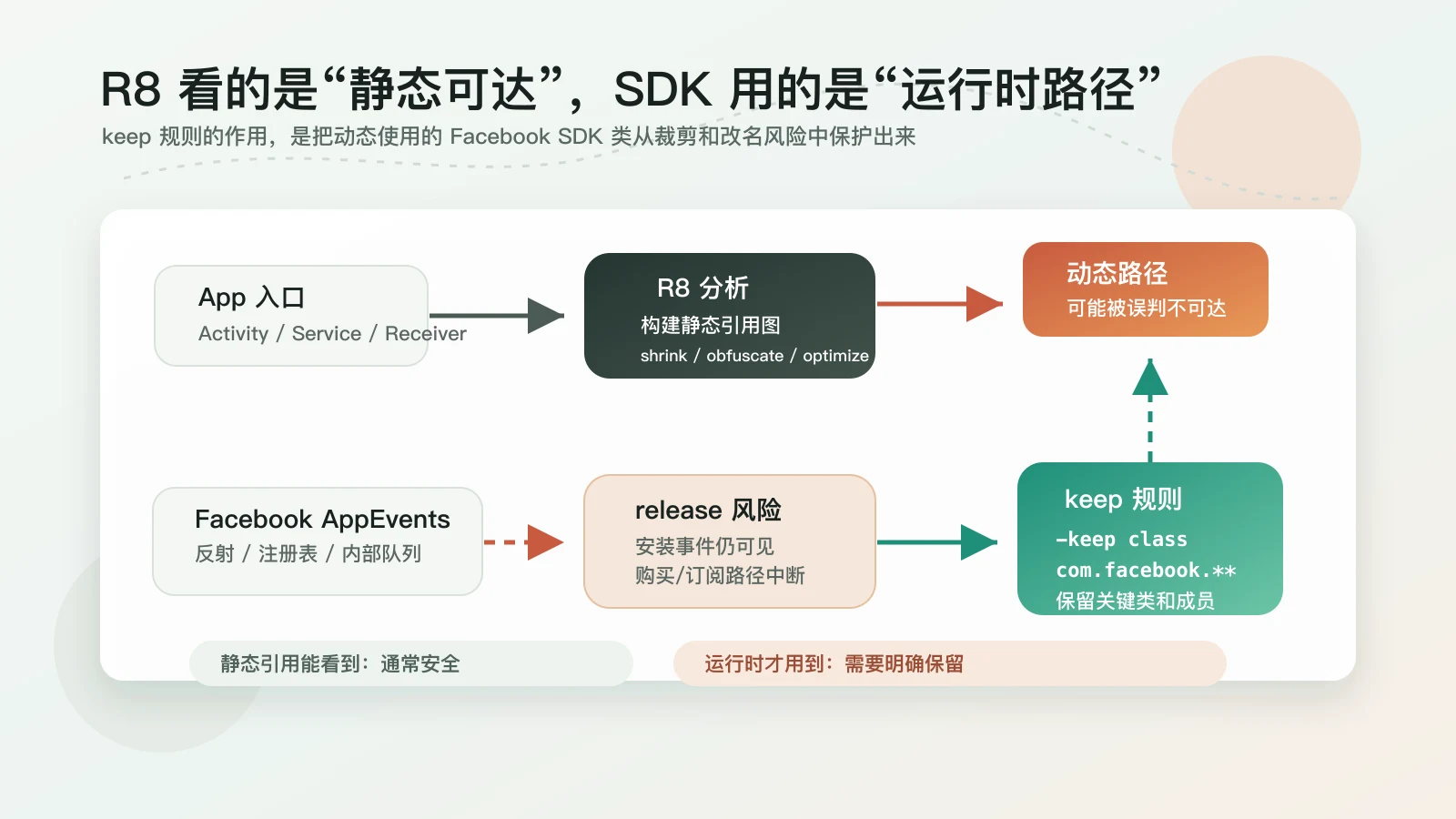
R8 is built around reachability analysis. It starts from app entry points such as Activity, Service, and Receiver in the manifest, then follows code references to build a graph. Code that can be reached is kept; code that cannot be reached may be deleted or rewritten.
The problem is that third-party SDKs often do not rely only on static calls. For example:
- Finding implementations by class name through reflection;
- Using annotations, configuration, or manifest metadata for dynamic initialization;
- Organizing features through event names, constants, or internal registries;
- Exposing only a thin plugin entry while the real logic lives inside the native SDK.
These relationships are valid at runtime, but may not be obvious enough to static analysis. R8 may decide that some classes are “unused”, then delete, rename, or merge them. The final symptom can be: the app does not crash, SDK initialization still works, install events may even appear, but a deeper event path is broken.
That is the most misleading part of this issue. It is not a compilation error, not a startup crash, and not a complete Facebook SDK failure. It is an analytics SDK losing part of its key event path only in the release package.
Why Debug/Profile Worked
The goal of a debug build is development and debugging. It usually does not enable release-level shrinking and obfuscation. Class names, method names, and call structures remain as intact as possible for debugging and hot reload.
profile is closer to performance testing, but it is still not the same as the final store release artifact. It can expose some performance issues, but cannot fully replace release validation.
So the reasoning for this kind of problem is:
debug works
profile works
release has install events but loses purchase/subscription events
  -> first compare release-only configuration
  -> focus on minifyEnabled / shrinkResources / proguardFiles
  -> then check whether the third-party SDK needs extra keep rules
If analytics are verified only on an emulator or debug build, it is easy to assume the integration is complete. For SDKs related to publishing, especially ads, attribution, payments, analytics, and login, it is better to verify them once with a release-signed package.
Final Fix
Temporarily disabling minifyEnabled can prove the direction, but it should not be the long-term solution. Turning off R8 for a release build loses benefits around package size, startup, and some resistance to reverse engineering.
A better fix is to add keep rules for Facebook SDK-related classes. That tells R8: these classes may be used dynamically by the SDK, so do not delete them, do not rename them, and do not rewrite their structure.
Add this to android/app/proguard-rules.pro:
# Keep Facebook SDK related classes.
# This is intentionally broad, suitable for restoring production behavior first,
# then narrowing later based on actual dependencies.
-keep class com.facebook.** { *; }
-keep interface com.facebook.** { *; }
-keep enum com.facebook.** { *; }

# If the project uses Facebook mediation through Google Ads, keep this adapter too.
-keep class com.google.ads.mediation.facebook.FacebookAdapter { *; }

# Explicitly keep the AppEvents logging entry point.
# This overlaps with com.facebook.**, but documents the intent.
-keep public class com.facebook.appevents.AppEventsLogger { *; }
Also confirm that the release build actually loads this rules file:
android {
    buildTypes {
        release {
            minifyEnabled true
            shrinkResources true
            proguardFiles getDefaultProguardFile('proguard-android-optimize.txt'), 'proguard-rules.pro'
        }
    }
}
If the project uses Kotlin DSL, the corresponding configuration is roughly:
android {
    buildTypes {
        release {
            isMinifyEnabled = true
            isShrinkResources = true
            proguardFiles(
                getDefaultProguardFile("proguard-android-optimize.txt"),
                "proguard-rules.pro",
            )
        }
    }
}
After the change, rebuild the release package and verify again. Purchase and subscription events reappeared in the Facebook backend.
Tradeoffs of Keep Rules
One thing to note: -keep class com.facebook.** { *; } is a broad rule.
Its advantage is that it is direct and stable, suitable when the issue is already affecting business data. Its cost is that R8 has less room to optimize code under the com.facebook package. For most apps, this cost is usually more acceptable than losing purchase/subscription events, but it is still an engineering tradeoff.
A more ideal path has two steps:
- First use a broad keep rule to restore behavior and confirm that the issue comes from R8;
- Later, if package size is extremely sensitive, narrow the rule based on the actual SDK version, mapping, and R8 configuration.
In other words, do not disable the entire release optimization pipeline just because one SDK has a problem. But also do not pursue a very narrow rule from the beginning if it greatly slows down validation. Restore data correctness first, then optimize the boundary of the rule.
The Useful Judgment From This Debugging Session
The most valuable part of this issue was not the final few ProGuard lines, but the debugging order.
Do not equate “the backend has no purchase/subscription data” with “the analytics code did not execute”. The event reporting chain is long, and any layer may swallow the result. Flutter code, the plugin bridge, the Android native SDK, the network queue, and backend display delay can all produce similar symptoms.
But in this case, debug/profile worked, while release had install events but no purchase/subscription events. That was a strong signal: the basic SDK path existed, and the problem was more likely in a specific event path of the release artifact. Temporarily disabling minifyEnabled and shrinkResources became an effective experiment.
The value of that experiment was not that it directly fixed the issue. It narrowed the problem space from an entire business chain down to R8. Once the problem space was smaller, the solution became clear: do not change the business call, do not bypass the SDK, but add keep rules.
Reusable Checklist
For similar “only fails in release” SDK issues, I would check in this order:
- Confirm whether the same business code works consistently in
debug/profile; - Reproduce with a release-signed package, not only a debug build;
- Distinguish whether the SDK is completely unavailable or only certain event types are missing;
- Use packet capture first to see whether target domain requests exist, but do not overinterpret payloads when SSL interception fails;
- Check
minifyEnabled,shrinkResources, andproguardFiles; - Temporarily disable release optimization to see whether the issue disappears;
- If it disappears, add keep rules for the relevant SDK;
- Restore release optimization and verify backend data with a real release package;
- Narrow keep rules later if necessary, to avoid overly broad optimization impact.
This method is not only for Facebook App Events. Firebase, AppsFlyer, Adjust, ad mediation, payment SDKs, and login SDKs can all run into similar issues if they rely on reflection, dynamic registration, or native bridges.
Summary
On the surface, this was a facebook_app_events issue where Android release builds did not report purchase/subscription events. More accurately, the SDK could still produce install-related events and Facebook domain requests, but the purchase/subscription AppEvents path failed. Fundamentally, release build optimization changed a code structure that the SDK depended on at runtime.
The final handling path was:
- First prove that the issue was not the business call or basic backend configuration;
- Use install events and packet capture to rule out “the SDK is completely unavailable”;
- Locate the issue to R8 by disabling release optimization temporarily;
- Fix it with Facebook SDK keep rules instead of permanently disabling
minifyEnabled.
For production analytics, release validation is part of the release process. This is especially true for purchase, subscription, and attribution data that affect marketing and revenue decisions. If a symptom clearly has release-only characteristics, R8 and keep rules should enter the investigation early.